Porting a Report from Legacy
An Archive of Components + Examples
Table of Contents
- BASE COMPONENTS
- SECONDARY COMPONENTS
- STORE
- COMMON REPORT TABLE ACTIONS
- MOBILE VIEWS
- COMPONENT SCREENSHOTS
- ADDITIONAL INFORMATION
BASE COMPONENTS
Table
A report table is created using multiple base components. The parent component BaseTable acts as the 'command center', handling communication with child components (via Vuex module getters) as well as initializing all user interactions on the table (via Vuex module actions).
Columns
The main structural component within a BaseTable is the BaseColumn. A table in this context will uses horizontally aligned columns to create a row. In the code block below I've added 1 column and bound the data from the BaseTable to that column with props defined in the BaseColumn component.
The <template> tag contained within the BaseColumn allows us to do customization scoped to that single instance of the BaseColumn component.
This functionality is handled with a <slot>.
Vue's documentation link to <slot>.
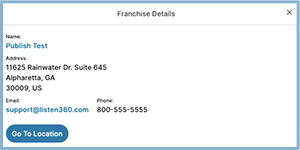
In the example below I'm instantiating an entire component within the <slot> FranchiseDetails. This component is hidden in the default view and contains links/contact information for that specific franchise/location.
Template Block
<BaseTable
  :data="responseRateData"
  :hideHeaders="isMobile"
  >
  <!-- FRANCHISE COL -->
  <BaseTableColumn
    colClass="w-40"
    :hidden="isMobile"
    :label="vocabulary.franchises_label"
    show="franchises"
    >
    <template #default="row">
      <FranchiseDetails
        :data="franchiseDetails"
        :name="row.organization_name"
        :href="`/organizations/${row.organization_id}`"
        />
    </template>
  </BaseTableColumn>
</BaseTable>
Script Block
export default {
  name: 'ResponseRateTable',
  data() {
    return {
      expandRow: false,
    }
  },
  components: {
    FranchiseDetails
  },
  computed: {
    ...mapGetters({
      vocabulary: 'responseRate/vocabulary', //--- organization defined nomenclature
      responseRateData: 'responseRate/data',  //--- data array of objects where each index corresponds to a row of that same value
      isMobile: 'screen/isMobile', //--- boolean used to determine which table to display
    })
  },
  methods: {
    ...mapActions({
   //---! more information in the Data/Vuex Section below ---!
    }),
    getTotalRequests(percentage, numerator) {
      return Math.round(numerator / (percentage / 100))
    }
  }
}
Action Bar
- Action Bar a base component that we use to wrap the actions available on the report table [view mode, search input, pagination]. Some reports have 2 instances [TableTopActionBar, TableBottomActionBar] The top action bar will wrap the View Mode UI as well as the search input. The bottom action bar will contain the pagination.
SECONDARY COMPONENTS
- Report Details
- Franchise DetailsFranchiseDetails` sceenshot below
- Breadcrumbs

STORE
What is Vuex? Vuex is a state management pattern + library for Vue.js applications. It serves as a centralized store for all the components in an application, with rules ensuring that the state can only be mutated in a predictable fashion
Links to existing store modules in Reports App:
You will notice a common pattern in the modules-
state {} the source of truth that drives our app
getters {} You can think of getters as computed properties for stores
mutations {} The only way to change the state in a Vuex store
actions {} Actions are similar to mutations, the differences being that:
- Instead of mutating the state, actions commit mutations
- Actions can contain arbitrary asynchronous operations
COMMON REPORT TABLE ACTIONS
MOBILE VIEWS
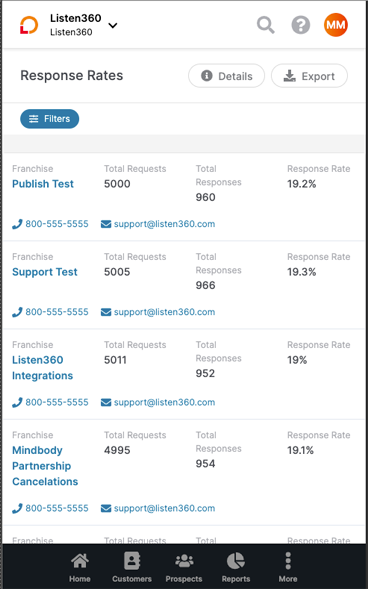
Mobile views are created using a `BaseTableColunm` that contains all the table fields formatted with CSS usually with a `flexbox` container. The resulting column resembles a general `Card` format
COMPONENT SCREENSHOTS
Response Rates Reports
Response Rates Reports